<br />
<b>Warning</b>:  "continue" targeting switch is equivalent to "break". Did you mean to use "continue 2"? in <b>/home/pdxgaypa/designatude.com/wp-content/plugins/revslider/includes/operations.class.php</b> on line <b>2851</b><br />
<br />
<b>Warning</b>:  "continue" targeting switch is equivalent to "break". Did you mean to use "continue 2"? in <b>/home/pdxgaypa/designatude.com/wp-content/plugins/revslider/includes/operations.class.php</b> on line <b>2855</b><br />
<br />
<b>Warning</b>:  "continue" targeting switch is equivalent to "break". Did you mean to use "continue 2"? in <b>/home/pdxgaypa/designatude.com/wp-content/plugins/revslider/includes/output.class.php</b> on line <b>3708</b><br />
<?xml version="1.0" encoding="UTF-8"?><rss version="2.0"
	xmlns:content="http://purl.org/rss/1.0/modules/content/"
	xmlns:wfw="http://wellformedweb.org/CommentAPI/"
	xmlns:dc="http://purl.org/dc/elements/1.1/"
	xmlns:atom="http://www.w3.org/2005/Atom"
	xmlns:sy="http://purl.org/rss/1.0/modules/syndication/"
	xmlns:slash="http://purl.org/rss/1.0/modules/slash/"
	>

<channel>
	<title>Wordpress</title>
	<atom:link href="https://www.designatude.com/blog/category/wordpress/feed/" rel="self" type="application/rss+xml" />
	<link>https://www.designatude.com</link>
	<description></description>
	<lastBuildDate>
	Thu, 18 Jul 2019 00:08:47 +0000	</lastBuildDate>
	<language>en-US</language>
	<sy:updatePeriod>
	hourly	</sy:updatePeriod>
	<sy:updateFrequency>
	1	</sy:updateFrequency>
	<generator>https://wordpress.org/?v=5.1.19</generator>
	<item>
		<title>What to Look for In a Digital Marketing Agency</title>
		<link>https://www.designatude.com/blog/what-to-look-for-in-a-digital-marketing-agency/</link>
				<pubDate>Thu, 28 Mar 2019 17:24:58 +0000</pubDate>
		<dc:creator><![CDATA[Brad]]></dc:creator>
				<category><![CDATA[Content Marketing]]></category>
		<category><![CDATA[Search Engine Optimization (SEO)]]></category>
		<category><![CDATA[Web Design]]></category>
		<category><![CDATA[Wordpress]]></category>

		<guid isPermaLink="false">https://www.designatude.com/?p=9310</guid>
				<description><![CDATA[<p>Figuring out what the best way is to proceed with your digital marketing can seem daunting to some. It can be a murky and difficult road to navigate and for some people, it may just be better and easier to go with an agency to handle your digital marketing for you. Or perhaps in house &#91;...&#93;</p>
<p>The post <a rel="nofollow" href="https://www.designatude.com/blog/what-to-look-for-in-a-digital-marketing-agency/">What to Look for In a Digital Marketing Agency</a> appeared first on <a rel="nofollow" href="https://www.designatude.com"></a>.</p>
]]></description>
								<content:encoded><![CDATA[<p>Figuring out what the best way is to proceed with your digital marketing can seem daunting to some. It can be a murky and difficult road to navigate and for some people, it may just be better and easier to go with an agency to handle your digital marketing for you. Or perhaps in house could work better for your business goals.</p>
<p>But how do you <a href="https://revive.digital/blog/your-digital-marketing-agency-what-to-expect/" target="_blank" rel="noopener noreferrer">choose the best digital marketing agency</a>? What kinds of things should you look for? And what is going to make one agency stand out from the crowd over the others?</p>
<h2>What does the Agency’s Website Tell You?</h2>
<p>An agency’s website should be your first source for information. Their site should tell you a lot of background info before you even get around to talking with someone.  The website should highlight their core competencies, what they feel that they do best. What are your primary needs for your business? Does the agency explain these things on their website?</p>
<p>You want to do your homework on a company before you ever even get to the point of speaking with a salesperson. Their website should be an integral part of that. What a company highlights on their website is going to give you a good and feel of what they do best.</p>
<h2>Really Talk with Your Current Agency</h2>
<p>If you are already working with an agency and trying to decide whether you should find a different one, this should really be one of your first steps.</p>
<p>When you are an existing client, often that agency does not want to disappoint you. Sometimes this may lead to them saying yes to requests they may not really be able to fulfill. They end up making promises they know they can’t keep.</p>
<p>It has more to do with a company trying to do everything they can to make a client happy, and sometimes some digital agencies will take on more than they can really handle. Find out if this is the case for your agency.  Find out if there is any way of reconciling the differences, or if it is best that you look elsewhere.</p>
<p>Make your expectations clear from the beginning. That way, if what you are looking for is beyond their area of expertise, they can be up front about that.</p>
<h2>Do Your Homework</h2>
<p>Try to have some information and be familiar with an agency before you approach them. Do they list other clients they have worked with on their website? Reach out to them if you can. Find out what they feel the company’s strengths and weaknesses are.  What do they do well? Is this in line with what you are looking for?</p>
<p>How are their search rankings?  And some companies will leave reviews right in the search rankings. What are other people saying about this agency? Does it sound like their skills are in line with your expectations?</p>
<h2>Check References</h2>
<p>This goes hand in hand with doing your homework. You can always ask for references. Who have they already worked with? Who are they working with now?  What makes them stand out and shine among the many different options that you have?</p>
<p>Once you are armed with all this information, you will be better equipped to make a decision.</p>
<h2>Have and Be Clear About Your Expectations</h2>
<p>The digital marketing agency you choose needs to be your partner in promoting your businesses and your goods or services.  How much time are you willing to put into the partnership? How much are you willing to spend? What skills does your current team have? What skills do they lack?</p>
<p>Don’t make rash impulse decisions. Be sure that you think through what you are looking for and what you need. Think critically about the questions above and know what you are looking for.</p>
<h2>What are Your Marketing Requirements?</h2>
<p>Do you know what exactly is it that you need? What are you looking for the agency to do?</p>
<p>Some examples might include:</p>
<ul>
<li><a href="https://www.designatude.com/portland-web-design/">Web design and development services</a></li>
<li>Content creation and writing services</li>
<li>Maintaining an updating a business blog</li>
<li>Do you need an <a href="https://www.designatude.com/portland-seo-company/">SEO consultant</a>?</li>
<li>Does your business need a fresh and new website?</li>
<li>Are you in search of social media services?</li>
<li>Are you looking for <a href="https://www.designatude.com/blog/5-impactful-ways-to-enhance-your-business-for-top-portland-seo-results/">local SEO services</a>?</li>
</ul>
<p>These are just a few examples. Your list may look very different, or be more extensive. Objectives in outsourcing your marketing could include brand awareness, making sure that your branding is consistent, or even increasing traffic to your website, as well as other avenues. Increasing sales leads may be a significant focus for you.</p>
<p>These steps and tips are going to get you heading in the right direction. There are hundreds of different digital marketing agencies out there. However, not all are going to meet the needs of every business out there. If they did, there wouldn&#8217;t be so many different options. The most critical steps are going to be that you need to be clear about what you are looking for and do your homework. Don’t act without thinking.</p>
<p>For any questions on learning more about our digital marketing services, you can contact our <a href="https://www.designatude.com/portland-seo-company/">seo portland</a> team today&#8230;503-933-6950!</p>
<p>&nbsp;</p>
<p>The post <a rel="nofollow" href="https://www.designatude.com/blog/what-to-look-for-in-a-digital-marketing-agency/">What to Look for In a Digital Marketing Agency</a> appeared first on <a rel="nofollow" href="https://www.designatude.com"></a>.</p>
]]></content:encoded>
										</item>
		<item>
		<title>Top 10 WordPress Plugins You Didn’t Know Your Website Needed</title>
		<link>https://www.designatude.com/blog/top-10-wordpress-plugins-you-didnt-know-your-website-needed/</link>
				<comments>https://www.designatude.com/blog/top-10-wordpress-plugins-you-didnt-know-your-website-needed/#comments</comments>
				<pubDate>Tue, 19 Jun 2018 18:36:35 +0000</pubDate>
		<dc:creator><![CDATA[James Gorski]]></dc:creator>
				<category><![CDATA[Web Design]]></category>
		<category><![CDATA[Web Development]]></category>
		<category><![CDATA[Wordpress]]></category>

		<guid isPermaLink="false">https://www.designatude.com/?p=6607</guid>
				<description><![CDATA[<p>The availability of thousands of plugins is one of the features that makes WordPress such an inviting content management system for anyone creating a blog or any other type of website. Plugins extend the functionality of this already powerful and intuitive platform. The following plugins are a few that you may not have considered for &#91;...&#93;</p>
<p>The post <a rel="nofollow" href="https://www.designatude.com/blog/top-10-wordpress-plugins-you-didnt-know-your-website-needed/">Top 10 WordPress Plugins You Didn’t Know Your Website Needed</a> appeared first on <a rel="nofollow" href="https://www.designatude.com"></a>.</p>
]]></description>
								<content:encoded><![CDATA[<p>The availability of thousands of plugins is one of the features that makes WordPress such an inviting content management system for anyone creating a blog or any other type of website. Plugins extend the functionality of this already powerful and intuitive platform.</p>
<p>The following plugins are a few that you may not have considered for your website, but they might prove critical in improving your website&#8217;s visibility, user experience, data collection capability and other factors.</p>
<h3><a href="https://sucuri.net/" target="_blank" rel="noopener nofollow noreferrer">Sucuri</a></h3>
<p>So many of us take the time to download anti-virus and anti-spyware software for our computer but fail to realize that we should also secure our website. Sucuri is a handy little plugin that prevents malware or other attacks on your website. It works by driving all incoming web traffic through their server where any malicious requests are filtered out.</p>
<p>This method of protecting your website has the effect of improving your website&#8217;s performance. In addition to this type of protection, Sucuri has a built-in anti-virus program that checks your website every 4 hours to ensure it&#8217;s devoid of malware or other similar problems.</p>
<p><img class="aligncenter wp-image-6632 size-large" src="https://www.designatude.com/wp-content/uploads/2018/06/securi-1024x543.jpg" alt="Sucuri wrodpress security plugin for better SEO in Portland " width="1024" height="543" srcset="https://www.designatude.com/wp-content/uploads/2018/06/securi-200x106.jpg 200w, https://www.designatude.com/wp-content/uploads/2018/06/securi-300x159.jpg 300w, https://www.designatude.com/wp-content/uploads/2018/06/securi-400x212.jpg 400w, https://www.designatude.com/wp-content/uploads/2018/06/securi-600x318.jpg 600w, https://www.designatude.com/wp-content/uploads/2018/06/securi-768x408.jpg 768w, https://www.designatude.com/wp-content/uploads/2018/06/securi-800x425.jpg 800w, https://www.designatude.com/wp-content/uploads/2018/06/securi-1024x543.jpg 1024w, https://www.designatude.com/wp-content/uploads/2018/06/securi-1200x637.jpg 1200w, https://www.designatude.com/wp-content/uploads/2018/06/securi.jpg 1204w" sizes="(max-width: 1024px) 100vw, 1024px" /></p>
<h3><a href="https://wordpress.org/plugins/show-plugin-menu-items-on-activation/" target="_blank" rel="noopener nofollow noreferrer">Show Plugin Menu Items on Activation</a></h3>
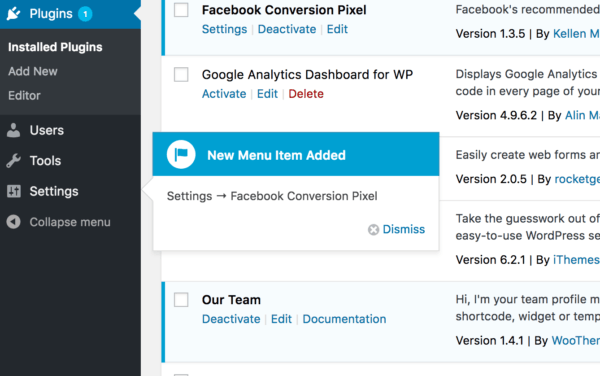
<p>This WordPress plugin may seem unimportant upon first examination, but it will probably save you plenty of time if you install and use many plugins. It&#8217;s basically a plugin that makes other plugins easier to use.</p>
<p>If you&#8217;ve had the experience of installing a plugin and then having to hunt around for the new menu items that enable you to access its functionality, then Show Plugin Menu Items on Activation is for you.</p>
<p>It does just that by incorporating pointers next to the new menu items that have to do with the plugin you just installed, so you&#8217;re quickly able to access its features.</p>
<p><img class="aligncenter wp-image-6638 size-600" src="https://www.designatude.com/wp-content/uploads/2018/06/show-plugin-menu-600x376.png" alt="Show Plugin Menu Items on Activation for wordpress" width="600" height="376" srcset="https://www.designatude.com/wp-content/uploads/2018/06/show-plugin-menu-200x125.png 200w, https://www.designatude.com/wp-content/uploads/2018/06/show-plugin-menu-300x188.png 300w, https://www.designatude.com/wp-content/uploads/2018/06/show-plugin-menu-320x202.png 320w, https://www.designatude.com/wp-content/uploads/2018/06/show-plugin-menu-400x251.png 400w, https://www.designatude.com/wp-content/uploads/2018/06/show-plugin-menu-600x376.png 600w, https://www.designatude.com/wp-content/uploads/2018/06/show-plugin-menu-768x481.png 768w, https://www.designatude.com/wp-content/uploads/2018/06/show-plugin-menu-800x501.png 800w, https://www.designatude.com/wp-content/uploads/2018/06/show-plugin-menu-1024x641.png 1024w, https://www.designatude.com/wp-content/uploads/2018/06/show-plugin-menu-1200x752.png 1200w, https://www.designatude.com/wp-content/uploads/2018/06/show-plugin-menu.png 1338w" sizes="(max-width: 600px) 100vw, 600px" /></p>
<h3><a href="https://wordpress.org/plugins/optinmonster/" target="_blank" rel="noopener noreferrer">OptinMonster</a></h3>
<p>Whether you want subscribers for your newsletter or leads to send marketing emails to, you&#8217;ll need a simple and enticing way for visitors to your site to opt-in to your email list. The professional, eye-catching templates that come with OptinMonster are excellent at converting visitors into leads, which is the critical first step before converting them into customers.</p>
<p>Sophisticated market targeting and segmentation tools enable visitors to receive customized messages that can be based on their geographic location, the site that referred them to your website, the page of your site that they landed on or other criteria.</p>
<p><img class="aligncenter wp-image-6643 size-full" src="https://www.designatude.com/wp-content/uploads/2018/06/optin-monster.jpg" alt="optin monster plugin for Portland web design wordpress sites" width="431" height="99" srcset="https://www.designatude.com/wp-content/uploads/2018/06/optin-monster-200x46.jpg 200w, https://www.designatude.com/wp-content/uploads/2018/06/optin-monster-300x69.jpg 300w, https://www.designatude.com/wp-content/uploads/2018/06/optin-monster-400x92.jpg 400w, https://www.designatude.com/wp-content/uploads/2018/06/optin-monster.jpg 431w" sizes="(max-width: 431px) 100vw, 431px" /></p>
<h3><a href="https://wordpress.org/plugins/updraftplus/" target="_blank" rel="noopener nofollow noreferrer">UpdraftPlus</a></h3>
<p>We all know that it&#8217;s important to regularly backup files on our computer in order to avoid data loss, but it&#8217;s also critical to do this for your WordPress website. The free version of UpdraftPlus enables you to schedule backups regularly, so your website is being protected from loss over time without you even having to give it any more thought.</p>
<p>You&#8217;ll be happy to know it incorporates popular cloud storage options such as Dropbox, Google Drive and Amazon S3. With this plugin, you don&#8217;t need to be an expert to easily backup and restore your website, and it will bring you peace of mind.</p>
<p><img class="aligncenter wp-image-6645 size-600" src="https://www.designatude.com/wp-content/uploads/2018/06/updraft-plus-600x200.jpg" alt="updraft plus for wordpress backups in Portland Oregon" width="600" height="200" srcset="https://www.designatude.com/wp-content/uploads/2018/06/updraft-plus-200x67.jpg 200w, https://www.designatude.com/wp-content/uploads/2018/06/updraft-plus-300x100.jpg 300w, https://www.designatude.com/wp-content/uploads/2018/06/updraft-plus-400x133.jpg 400w, https://www.designatude.com/wp-content/uploads/2018/06/updraft-plus-600x200.jpg 600w, https://www.designatude.com/wp-content/uploads/2018/06/updraft-plus-768x256.jpg 768w, https://www.designatude.com/wp-content/uploads/2018/06/updraft-plus-800x266.jpg 800w, https://www.designatude.com/wp-content/uploads/2018/06/updraft-plus-1024x341.jpg 1024w, https://www.designatude.com/wp-content/uploads/2018/06/updraft-plus.jpg 1199w" sizes="(max-width: 600px) 100vw, 600px" /></p>
<h3><a href="https://www.monsterinsights.com/" target="_blank" rel="noopener nofollow noreferrer">MonsterInsights</a></h3>
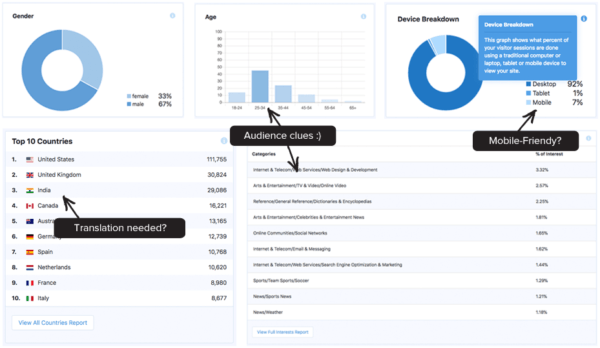
<p>You may be content to only have the capabilities on your WordPress website that make it minimally functional, but this can be shortsighted. If you want your website to grow, this requires getting information, so you know how to change it to appeal to potential visitors and the search engines.</p>
<p>MonsterInsights is a Google analytics plugin that keeps track of things such as downloads from your site, e-commerce transactions, form submissions and basically every other way a visitor interacts with your website. This plugin simplifies and automates a lot of the collection of this type of data that is critical to better understanding your website&#8217;s audience and helping you optimize the way you appeal to it.</p>
<p><img class="aligncenter wp-image-6647 size-600" src="https://www.designatude.com/wp-content/uploads/2018/06/monster-insights-600x348.png" alt="Monster Insights plugin for wordpress" width="600" height="348" srcset="https://www.designatude.com/wp-content/uploads/2018/06/monster-insights-200x116.png 200w, https://www.designatude.com/wp-content/uploads/2018/06/monster-insights-300x174.png 300w, https://www.designatude.com/wp-content/uploads/2018/06/monster-insights-400x232.png 400w, https://www.designatude.com/wp-content/uploads/2018/06/monster-insights-600x348.png 600w, https://www.designatude.com/wp-content/uploads/2018/06/monster-insights-768x446.png 768w, https://www.designatude.com/wp-content/uploads/2018/06/monster-insights-800x464.png 800w, https://www.designatude.com/wp-content/uploads/2018/06/monster-insights.png 929w" sizes="(max-width: 600px) 100vw, 600px" /></p>
<h3><a href="https://wordpress.org/plugins/woocommerce/" target="_blank" rel="noopener nofollow noreferrer">WooCommerce</a></h3>
<p>Perhaps you are running an e-commerce website with WordPress, or maybe you wish to add the capability to sell some merchandise to people who read your blog. WooCommerce is such a simple and powerful way to do this that it has become the most popular e-commerce plugin on the WordPress platform.</p>
<p>You can sell physical goods or digital products such as e-books, and it even has hundreds of its own free and paid extensions, so you can customize it for your exact needs. Setting up your online store is made easy with simple documentation, and there is online support for any questions you may have.</p>
<p><img class="aligncenter wp-image-6649 size-600" src="https://www.designatude.com/wp-content/uploads/2018/06/woocommerce-600x697.png" alt="woocommerce for wodpress web design services in Portland" width="600" height="697" srcset="https://www.designatude.com/wp-content/uploads/2018/06/woocommerce-200x232.png 200w, https://www.designatude.com/wp-content/uploads/2018/06/woocommerce-258x300.png 258w, https://www.designatude.com/wp-content/uploads/2018/06/woocommerce-400x465.png 400w, https://www.designatude.com/wp-content/uploads/2018/06/woocommerce-600x697.png 600w, https://www.designatude.com/wp-content/uploads/2018/06/woocommerce.png 700w" sizes="(max-width: 600px) 100vw, 600px" /></p>
<h3><a href="https://wordpress.org/plugins/thirstyaffiliates/" target="_blank" rel="noopener nofollow noreferrer">Thirsty Affiliates</a></h3>
<p>Affiliate marketing is a way for you to monetize your blog or other types of websites by offering people a variety of products that are related to the subject matter of your site. Thirsty Affiliates makes adding and changing links to affiliate sites a breeze.</p>
<p>It comes with click statistics and reports, so you&#8217;ll know how many visitors are clicking on your affiliate links. If your blog or website gets a decent amount of traffic and you&#8217;re not currently utilizing affiliate marketing to earn more from your site, Thirsty Affiliates can get you started quickly and easily.</p>
<p><img class="aligncenter wp-image-6653 size-400" src="https://www.designatude.com/wp-content/uploads/2018/06/thirsty-affilliates2-400x194.jpg" alt="thirsty affiliates wp plugin" width="400" height="194" srcset="https://www.designatude.com/wp-content/uploads/2018/06/thirsty-affilliates2-200x97.jpg 200w, https://www.designatude.com/wp-content/uploads/2018/06/thirsty-affilliates2-300x146.jpg 300w, https://www.designatude.com/wp-content/uploads/2018/06/thirsty-affilliates2-400x194.jpg 400w, https://www.designatude.com/wp-content/uploads/2018/06/thirsty-affilliates2-600x292.jpg 600w, https://www.designatude.com/wp-content/uploads/2018/06/thirsty-affilliates2.jpg 650w" sizes="(max-width: 400px) 100vw, 400px" /></p>
<h3><a href="https://yoast.com/" target="_blank" rel="noopener noreferrer">Yoast SEO</a></h3>
<p>Search engine optimization can be a tedious task, but neglecting it means your blog or website will be buried under the competition and not found by anyone. Yoast SEO supercharges <a href="https://www.designatude.com/portland-seo-company/">SEO</a> for your WordPress site and makes optimizing it for the search engines far simpler than trying to manually tweak it for this purpose.</p>
<p><strong>Related article</strong>: <a href="https://www.designatude.com/blog/15-tactics-to-optimize-your-website-for-higher-seo-rankings-for-2019/">15 TACTICS TO OPTIMIZE YOUR WEBSITE FOR HIGHER SEO RANKINGS FOR 2019</a></p>
<p>If you don&#8217;t have the money to hire a digital marketing agency or the time to manually handle the technical aspects of SEO on your own, <a href="https://designrfix.com/wordpress/wordpress-seo-plugins-seo-pack-yoast-seo" target="_blank" rel="noopener noreferrer">Yoast SEO</a> will come to the rescue by handling elements of SEO such as XML sitemaps, meta tag editing and so much more.</p>
<p><img class="aligncenter wp-image-6630 size-full" src="https://www.designatude.com/wp-content/uploads/2018/06/yoast.jpg" alt="yoast seo wordpress plugin for SEO in Portland" width="504" height="102" srcset="https://www.designatude.com/wp-content/uploads/2018/06/yoast-200x40.jpg 200w, https://www.designatude.com/wp-content/uploads/2018/06/yoast-300x61.jpg 300w, https://www.designatude.com/wp-content/uploads/2018/06/yoast-400x81.jpg 400w, https://www.designatude.com/wp-content/uploads/2018/06/yoast.jpg 504w" sizes="(max-width: 504px) 100vw, 504px" /></p>
<h3><a href="https://wordpress.org/plugins/ewww-image-optimizer/" target="_blank" rel="noopener nofollow noreferrer">EWWW Image Optimizer</a></h3>
<p>You probably already know you need some kind of gallery for organizing the images on your website. What some people don&#8217;t realize, however, is that images are a big reason for slow loading of websites.</p>
<p>With EWWW Image Optimizer, images you upload will automatically be compressed using its advanced compression algorithm without sacrificing quality. Page load speed is an important factor in search engine optimization and user experience, so make sure your images aren&#8217;t holding you back with this simple but useful plugin.</p>
<p><img class="aligncenter wp-image-6656 size-400" src="https://www.designatude.com/wp-content/uploads/2018/06/eeew-image-400x150.jpg" alt="ewww image plugin for Portland WordPress services" width="400" height="150" srcset="https://www.designatude.com/wp-content/uploads/2018/06/eeew-image-200x75.jpg 200w, https://www.designatude.com/wp-content/uploads/2018/06/eeew-image-300x113.jpg 300w, https://www.designatude.com/wp-content/uploads/2018/06/eeew-image-400x150.jpg 400w, https://www.designatude.com/wp-content/uploads/2018/06/eeew-image-600x225.jpg 600w, https://www.designatude.com/wp-content/uploads/2018/06/eeew-image.jpg 753w" sizes="(max-width: 400px) 100vw, 400px" /></p>
<h3><a href="https://wordpress.org/plugins/broken-link-checker/" target="_blank" rel="noopener nofollow noreferrer">Broken Link Checker</a></h3>
<p>Making sure your website is free of broken links will improve your search engine optimization while also saving frustration on the part of visitors to your site. There are fewer things more annoying when surfing the web than coming across an interesting sounding link on a site and then getting taken to an error page after clicking on it.</p>
<p>This makes your website look unprofessional and will cause many visitors to go elsewhere. Fortunately, Broken Link Checker will monitor your site for broken links, and it notifies you via email or the WordPress dashboard, so you can fix them promptly, and keep the search engines and visitors happy.</p>
<p><img class="aligncenter wp-image-6659 size-400" src="https://www.designatude.com/wp-content/uploads/2018/06/broken-link-checker-400x129.jpg" alt="broken link checker plugin for WordPress services in Portland Or" width="400" height="129" srcset="https://www.designatude.com/wp-content/uploads/2018/06/broken-link-checker-200x64.jpg 200w, https://www.designatude.com/wp-content/uploads/2018/06/broken-link-checker-300x97.jpg 300w, https://www.designatude.com/wp-content/uploads/2018/06/broken-link-checker-400x129.jpg 400w, https://www.designatude.com/wp-content/uploads/2018/06/broken-link-checker-600x193.jpg 600w, https://www.designatude.com/wp-content/uploads/2018/06/broken-link-checker-768x247.jpg 768w, https://www.designatude.com/wp-content/uploads/2018/06/broken-link-checker-800x258.jpg 800w, https://www.designatude.com/wp-content/uploads/2018/06/broken-link-checker-1024x330.jpg 1024w, https://www.designatude.com/wp-content/uploads/2018/06/broken-link-checker.jpg 1068w" sizes="(max-width: 400px) 100vw, 400px" /></p>
<p>If you have any questions regarding WordPress or <a href="https://www.designatude.com/portland-web-design/">web design services</a>. Contact <a href="https://www.designatude.com/">Designatude</a> today!</p>
<div class="source"></div>
<p>The post <a rel="nofollow" href="https://www.designatude.com/blog/top-10-wordpress-plugins-you-didnt-know-your-website-needed/">Top 10 WordPress Plugins You Didn’t Know Your Website Needed</a> appeared first on <a rel="nofollow" href="https://www.designatude.com"></a>.</p>
]]></content:encoded>
							<wfw:commentRss>https://www.designatude.com/blog/top-10-wordpress-plugins-you-didnt-know-your-website-needed/feed/</wfw:commentRss>
		<slash:comments>4</slash:comments>
							</item>
		<item>
		<title>Speeding Up Your WordPress Website in Less Than 5 Minutes</title>
		<link>https://www.designatude.com/blog/speeding-wordpress-website-less-5-minutes/</link>
				<comments>https://www.designatude.com/blog/speeding-wordpress-website-less-5-minutes/#comments</comments>
				<pubDate>Tue, 24 Jul 2018 18:43:54 +0000</pubDate>
		<dc:creator><![CDATA[Brad]]></dc:creator>
				<category><![CDATA[Web Design]]></category>
		<category><![CDATA[Web Development]]></category>
		<category><![CDATA[Wordpress]]></category>

		<guid isPermaLink="false">https://www.designatude.com/?p=5845</guid>
				<description><![CDATA[<p>The quick, easy and free way to speed up your WordPress website! The intention for publishing this article is to inform WordPress users that are not super technical savvy, on a quick and easy method of speeding up your WordPress site. There are plenty of options out there, some free and some paid, and I &#91;...&#93;</p>
<p>The post <a rel="nofollow" href="https://www.designatude.com/blog/speeding-wordpress-website-less-5-minutes/">Speeding Up Your WordPress Website in Less Than 5 Minutes</a> appeared first on <a rel="nofollow" href="https://www.designatude.com"></a>.</p>
]]></description>
								<content:encoded><![CDATA[<h2 class="large2">The quick, easy and free way to speed up your WordPress website!</h2>
<p>The intention for publishing this article is to inform WordPress users that are not super technical savvy, on a quick and easy method of speeding up your WordPress site. There are plenty of options out there, some free and some paid, and I will go into a few of those.</p>
<p>I look at this method as being a good temporary upgrade, while giving you time to decide on other alternatives that will give your website near perfect scores for loading speed optimization.</p>
<h3 class="small">Why is your website speed so important?</h3>
<p>Well, first of all, nobody likes a website that takes forever to load. Most visitors, and myself included, will bounce off a website that is taking more than 3 seconds to load. Call me a speed snob, but reality is, that a slow loading site is in big trouble from a visitor and traffic stand point.</p>
<p>Second, as I write this article, Google has officially made website speed a <a href="https://techcrunch.com/2018/01/17/google-will-make-page-speed-a-factor-in-mobile-search-ranking-starting-in-july/" target="_blank" rel="noopener noreferrer">Ranking Signal</a> to become effective for the upcoming months. So from a visitor experience and top <a href="https://www.designatude.com/portland-seo-company/">Search Engine Optimization</a> results, having a quick loading website is essential for surviving and ranking well in the SERPs.</p>
<p><strong>Related article</strong>: <a href="https://www.designatude.com/blog/15-tactics-to-optimize-your-website-for-higher-seo-rankings-for-2019/">15 TACTICS TO OPTIMIZE YOUR WEBSITE FOR HIGHER SEO RANKINGS FOR 2019</a></p>
<h3 class="small">Some Methods for Checking Your Website Speed</h3>
<p>There are <a href="https://kinsta.com/blog/website-speed-test/" target="_blank" rel="nofollow noopener noreferrer">several free tools</a> out there for checking your website speed. Most of these give you a grade based on several of the factors involved for better speed optimization. For the method I am using and suggesting, I used these 2 tools:</p>
<p><a href="https://developers.google.com/speed/pagespeed/insights/" target="_blank" rel="nofollow noopener noreferrer">Google Page Speed Insights</a><br />
<a href="https://tools.pingdom.com/" target="_blank" rel="noopener noreferrer">Pingdom Website Speed Test</a></p>
<p>My results after applying my free 5 minute method:</p>
<p><img class="aligncenter wp-image-5856 size-full" src="https://www.designatude.com/wp-content/uploads/2018/01/google-page-speed.jpg" alt="fast loading websites by Designatude Portland SEO" width="501" height="429" srcset="https://www.designatude.com/wp-content/uploads/2018/01/google-page-speed-200x171.jpg 200w, https://www.designatude.com/wp-content/uploads/2018/01/google-page-speed-300x257.jpg 300w, https://www.designatude.com/wp-content/uploads/2018/01/google-page-speed-400x343.jpg 400w, https://www.designatude.com/wp-content/uploads/2018/01/google-page-speed.jpg 501w" sizes="(max-width: 501px) 100vw, 501px" /></p>
<p><img class="aligncenter wp-image-5857 size-large" src="https://www.designatude.com/wp-content/uploads/2018/01/website-speed-pingdom-1024x278.jpg" alt="fast loading websites by Designatude Portland Web Design" width="1024" height="278" srcset="https://www.designatude.com/wp-content/uploads/2018/01/website-speed-pingdom-200x54.jpg 200w, https://www.designatude.com/wp-content/uploads/2018/01/website-speed-pingdom-300x81.jpg 300w, https://www.designatude.com/wp-content/uploads/2018/01/website-speed-pingdom-400x108.jpg 400w, https://www.designatude.com/wp-content/uploads/2018/01/website-speed-pingdom-600x163.jpg 600w, https://www.designatude.com/wp-content/uploads/2018/01/website-speed-pingdom-768x208.jpg 768w, https://www.designatude.com/wp-content/uploads/2018/01/website-speed-pingdom-800x217.jpg 800w, https://www.designatude.com/wp-content/uploads/2018/01/website-speed-pingdom-1024x278.jpg 1024w, https://www.designatude.com/wp-content/uploads/2018/01/website-speed-pingdom-1200x325.jpg 1200w, https://www.designatude.com/wp-content/uploads/2018/01/website-speed-pingdom.jpg 1224w" sizes="(max-width: 1024px) 100vw, 1024px" /></p>
<p>Unfortunately Google did not give me my speed grade, as they are now testing their Beta version of Insights, which I haven&#8217;t upgraded to yet. I will update the results for that as soon as I test on the Beta version.</p>
<p>Okay, so these scores are not perfect, but still better than many of the websites out there. I want to emphasize that this is the <strong>Free Upgrade</strong>. I used 2 WordPress plugins and the task was done in <strong>less than 5 minutes</strong>.</p>
<h3 class="small">Image compression, website cache, and combining/minimizing files.</h3>
<p>I have found these to be 3 of the most effective methods for greatly increasing website speed. Although there are several variables that come to play for website speed optimization, image compression, site cache, and combining/minimizing files, is a great start. I will be getting into a more in depth look at all the factors that affect your website speed, in my next article.</p>
<h3 class="small">2 easy to install WordPress plugins.</h3>
<p>First off, I installed the very popular cache plugin <a href="https://wordpress.org/plugins/wp-fastest-cache/" target="_blank" rel="nofollow noopener noreferrer">WP Fastest Cache</a>. It has been downloaded and used by over a 1/2 million WordPress users!</p>
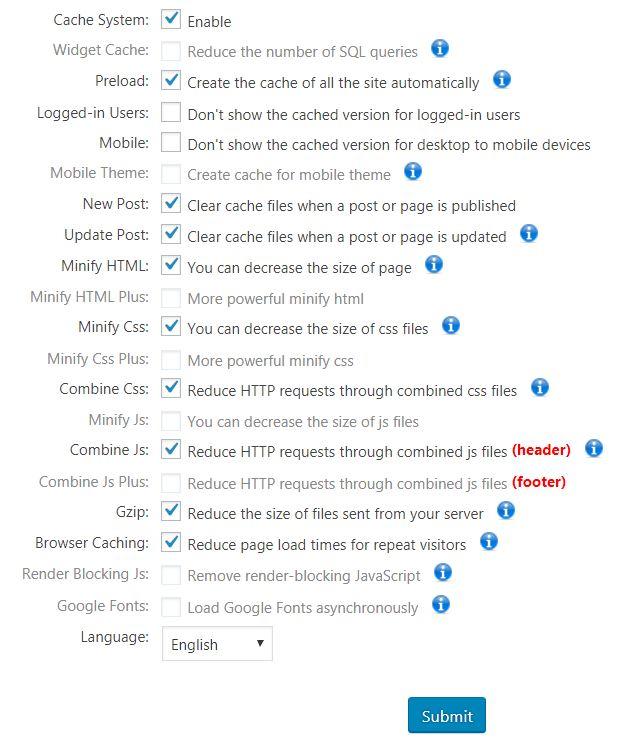
<p>So just download or easily install this through your WordPress dashboard. I checked off the following available free options:</p>
<p><img class="aligncenter wp-image-5869 size-full" src="https://www.designatude.com/wp-content/uploads/2018/01/wp-fastest-cache.jpg" alt="wp fastest cache plugin for higher SEO results in Portland Oregon" width="640" height="756" srcset="https://www.designatude.com/wp-content/uploads/2018/01/wp-fastest-cache-200x236.jpg 200w, https://www.designatude.com/wp-content/uploads/2018/01/wp-fastest-cache-254x300.jpg 254w, https://www.designatude.com/wp-content/uploads/2018/01/wp-fastest-cache-400x473.jpg 400w, https://www.designatude.com/wp-content/uploads/2018/01/wp-fastest-cache-600x709.jpg 600w, https://www.designatude.com/wp-content/uploads/2018/01/wp-fastest-cache.jpg 640w" sizes="(max-width: 640px) 100vw, 640px" /></p>
<p>This is the <strong>free version</strong>! For being free, this plugin does a fantastic job right out of the box. The <a href="https://www.designatude.com/portland-web-design/">web designers</a> offer a paid version for just $39.99 that includes image compression and other great functions for increasing your site speed. For the low price, I highly recommend considering the premium version.</p>
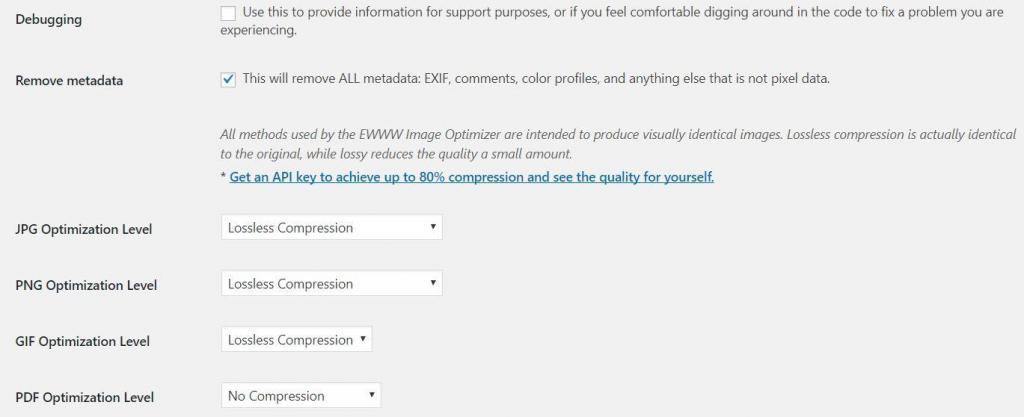
<p>The second plugin I installed is the <a href="https://wordpress.org/plugins/ewww-image-optimizer/" target="_blank" rel="nofollow noopener noreferrer">EWWW Image Optimizer plugin</a>. Also, downloaded and used by over a 1/2 million WordPress users!</p>
<p>For this plugin, you can use the basic default settings, and it works just fine. They offer an inexpensive premium option as well.</p>
<p><img class="aligncenter wp-image-5875 size-large" src="https://www.designatude.com/wp-content/uploads/2018/01/ewww-image-compression-1024x417.jpg" alt="ewww image compression plugin for fast loading websites in Portland" width="1024" height="417" srcset="https://www.designatude.com/wp-content/uploads/2018/01/ewww-image-compression-200x82.jpg 200w, https://www.designatude.com/wp-content/uploads/2018/01/ewww-image-compression-300x122.jpg 300w, https://www.designatude.com/wp-content/uploads/2018/01/ewww-image-compression-400x163.jpg 400w, https://www.designatude.com/wp-content/uploads/2018/01/ewww-image-compression-600x245.jpg 600w, https://www.designatude.com/wp-content/uploads/2018/01/ewww-image-compression-669x272.jpg 669w, https://www.designatude.com/wp-content/uploads/2018/01/ewww-image-compression-768x313.jpg 768w, https://www.designatude.com/wp-content/uploads/2018/01/ewww-image-compression-800x326.jpg 800w, https://www.designatude.com/wp-content/uploads/2018/01/ewww-image-compression-1024x417.jpg 1024w, https://www.designatude.com/wp-content/uploads/2018/01/ewww-image-compression-1200x489.jpg 1200w, https://www.designatude.com/wp-content/uploads/2018/01/ewww-image-compression.jpg 1369w" sizes="(max-width: 1024px) 100vw, 1024px" /></p>
<h3 class="small">Simple, quick and effective!</h3>
<p>Well, there you have it. 2 very easy to install and use plugins. Both of these free, and very popular for a reason. They both offer inexpensive premium options as well.</p>
<p>Just by taking 5 minutes and using the free versions of the plugins above, my website became faster than over 90% of my competitors!</p>
<p>***I have tried several cache plugins that were tasking to set up, some did wonky things to my site, and were not as effective as the free version of WP Fastest Cache plugin.</p>
<p>These developers did an excellent job making this plugin very effective, and super easy for WordPress users to employ</p>
<p>For any questions on WordPress Web Design, get in contact with <a href="https://www.designatude.com/">Designatude</a> today!</p>
<p>The post <a rel="nofollow" href="https://www.designatude.com/blog/speeding-wordpress-website-less-5-minutes/">Speeding Up Your WordPress Website in Less Than 5 Minutes</a> appeared first on <a rel="nofollow" href="https://www.designatude.com"></a>.</p>
]]></content:encoded>
							<wfw:commentRss>https://www.designatude.com/blog/speeding-wordpress-website-less-5-minutes/feed/</wfw:commentRss>
		<slash:comments>6</slash:comments>
							</item>
	</channel>
</rss>